Support
Get in touch, and find quick answers to the questions that come up most.
Contact the developer
For feedback, a suggestion, or a bug report, email sincere.apps@gmail.com. You can also reach this from inside the app: open Settings and tap Contact developer, which attaches logs so a problem is faster to track down.
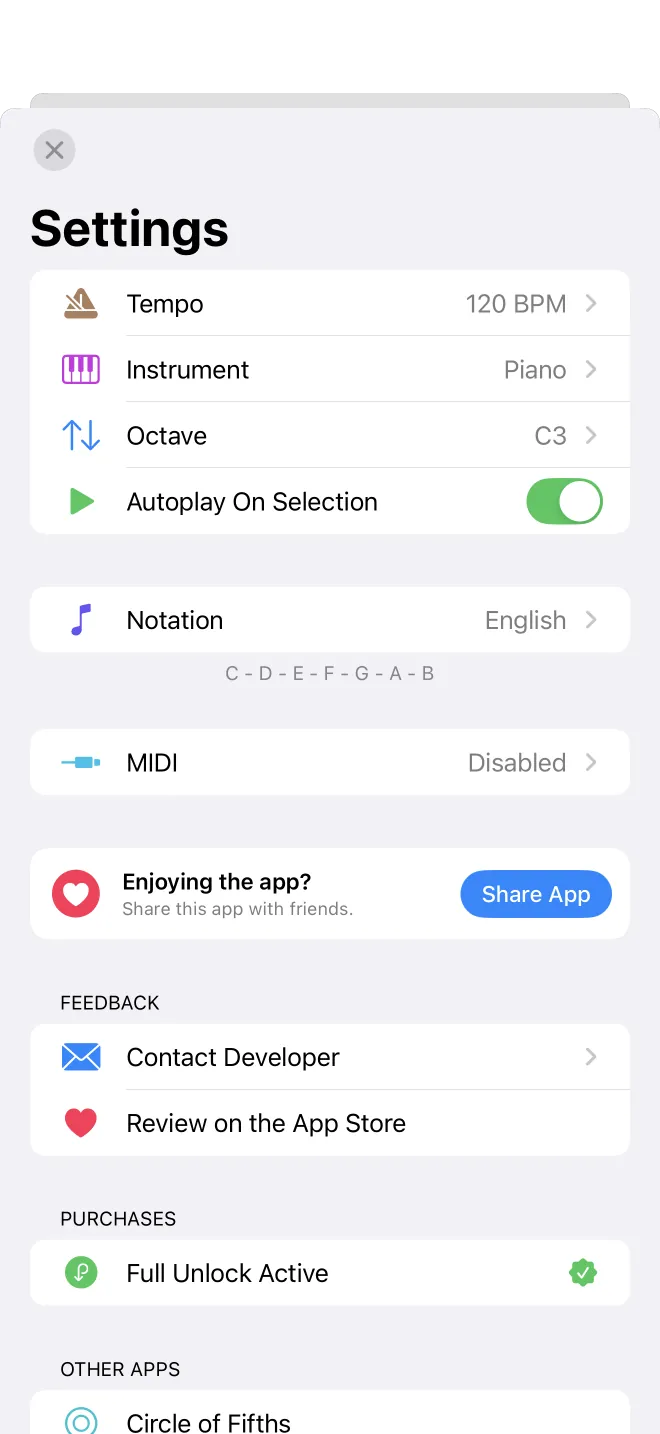
Where the settings live
Open the More tab, then tap the gear in the corner. Tempo, instrument, note names, and MIDI all sit on this one screen.
No sound?
Check the silent switch and the volume first. If a Bluetooth speaker is paired, check that too. In Settings you can also turn on Autoplay, so a chord sounds the moment you pick it. If there is still no sound, try restarting the app.
Restore a purchase
New phone, or reinstalled the app? Open the premium screen and tap Restore Purchases. Your unlock comes back, tied to your Apple ID, with no second charge. You can confirm it in Settings, where an active unlock is marked with a green seal.
Cancel or change your plan
Subscriptions are billed by Apple, so you manage them there. Open the iOS Settings app, tap your name at the top, then Subscriptions, and choose Chords and Scales.
Ask for a refund
Refunds go through Apple, not the app. Visit reportaproblem.apple.com, sign in, and pick the purchase.
Change the note names
Prefer H instead of B, or a different style? Open Settings and tap Notation. The example at the bottom shows how your notes will read before you commit.
Set up a MIDI keyboard
Open Settings and tap MIDI. The status line tells you what is connected. Plug in or pair your keyboard, then play, and the app follows along.
Does it work offline?
Yes. Finding and playing chords and scales needs no connection at all.